


As cyberattacks continue to become more sophisticated, traditional password and MFA protections are not as effective as they once were.
Zero-trust helps to prevent unauthorized logins.
What’s Wrong with Passwords?
The purpose of a password is to authenticate, or prove, that you are who you say you are. The problem is that a password is a secret that can be shared, perhaps inadvertently: whoever obtains it can potentially authenticate as you and log into your accounts.
Multi-factor authentication, or MFA, is another layer that adds an additional step to verify your identity. With MFA enabled, you would need to further authenticate with something you have (such as your phone) or something you are (such as a fingerprint).
For years, passwords combined with MFA was an effective 1-2 punch that provided a substantial improvement in account security. Once you’ve successfully authenticated, a website or application typically gives your browser a session token, which is like a temporary digital ID badge. Your browser uses this token to demonstrate that you have already authenticated, so you don’t have to enter your password every time you visit.
However, attackers are continuously developing more sophisticated methods to steal that session token. If acquired, they may be able to use it to access your account without knowing your password or completing MFA themselves. While passwords and MFA still offer an important layer of protection, they can be by-passed.
Adding Another Layer of Proof
As described above, an attacker can steal your password and/or your session token to login as you. But what if we authenticate with something that’s much more difficult to steal: your physical hardware? In a Microsoft 365 environment, it is possible to restrict logins to specific “trusted” devices. This means that even if an attacker has the right credentials, they cannot login as you if they are not logging in from your trusted device. Unless an attacker has control of your device, this security layer would keep them out of your Microsoft 365 account.
Hardening Security For Your Organization
Implementing a Zero-Trust Device Policy will benefit your organization in three ways:
- Reduced Impact of Stolen Passwords. There will always be a risk that one of your employees gets phished and gives away their password. While certainly not ideal, an attacker will not be able to use this password to login and access that employees Microsoft account (emails, OneDrive, SharePoint, etc.)
- Stricter Data Controls. With an email and password, an employee could potentially login from any computer at any time. This could be from their personal PC or phone, a shared family computer, or at a hotel business center on the other side of the world. What assurances do you have that those devices, and the networks that they are connected to, are safe? With a zero-trust device policy, this risk is very well mitigated.
- Streamlined Offboarding. If an employee loses their device or is terminated, your IT department can perform an instant “selective wipe” that will remove all corporate emails and files off of their device. This is especially useful if an employee was accessing their corporate emails from their personal phone – your company data can be removed without impacting their personal data.
How It Works In Practice
Imagine that one of your employees receives an urgent email from “Microsoft” that requires immediate attention. The well-intentioned employee clicks the link and is asked to login to their Microsoft account to rectify the issue. The page looks like the legitimate Microsoft login page, but it’s part of the deception.
After the employee enters their credentials, the fake page relays that to the real Microsoft login site. An MFA code is generated, which the attacker feeds back to the user on the fake login page. The user passes the MFA challenge and is authenticated… but so is the attacker, who now has your employee’s session token and access to their Microsoft account. They would quickly take action to make this access persistent, and could remain undetected while they extract valuable data from your organization.
This is an Adversary-in-the-Middle (AiTM) reverse proxy attack, and is one way that an attacker can breach your defenses.
Now imagine that you had established a Zero-Trust Device Policy beforehand. When the attacker attempts to login with the stolen session token from their computer, it will fail. The reason is that they are not logging in from a trusted device.
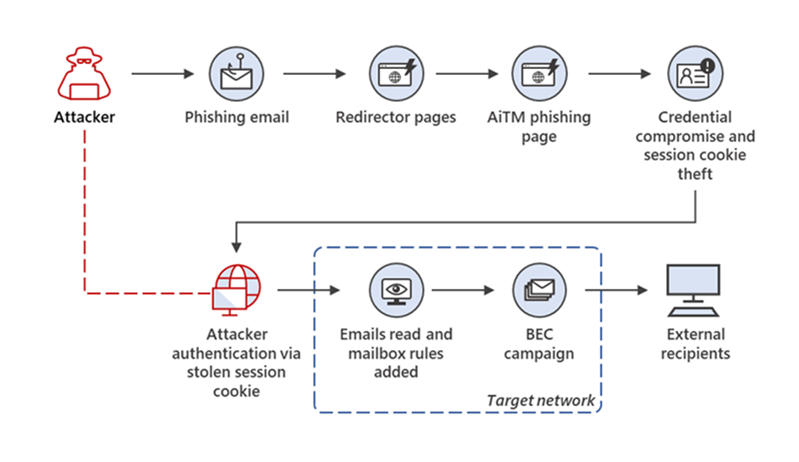
A visual representation of an AiTM reverse proxy phishing attack, provided by Microsoft
Next Steps
Setting up a Zero-Trust Device Policy on your organization’s Microsoft tenant is a valuable additional layer of IT security. One of the best aspects of this security feature is that it is not a separate tool or subscription. As long as your organization is using Business Premium licenses, you are already paying for this feature, it’s just a matter of configuring it properly to improve the security of your first-party Microsoft apps, with additional effort to similarly secure your third-party apps.
Are you interested in getting your organization on a Zero-Trust Device Policy, or do you have other cybersecurity related questions? Feel free to contact us and we would be happy to chat!